Blog
eSIM or Physical SIM: Which One Works Best for You in 2025?
Wi-Fi technology keeps evolving, and with Wi-Fi 6 widely available and Wi-Fi 7 on the way, many Canadians are wondering if it's time to upgrade. Faster speeds, better connectivity, and lower latency sound great—but what do you really need to know before making the switch?
Why Upgrade?
Wi-Fi 6 (802.11ax) brings faster speeds (up to 9.6 Gbps), better performance in crowded networks and improved efficiency for multiple devices. If you have a smart home or a household full of gamers or multiple people streaming video, this upgrade is a game changer.
Wi-Fi 7 (802.11be), expected in late 2024 or 2025, takes things even further with speeds up to 46 Gbps, reduced lag, and multi-link operation, allowing devices to connect across different frequency bands simultaneously for better stability.
What’s New with Wi-Fi 6 & 7?
Wi-Fi 6 (802.11ax) improves speed (up to 9.6 Gbps), efficiency, and performance in crowded networks. It’s great for smart homes, streaming, and gaming.
Wi-Fi 7 (802.11be) expected in late 2024 or 2025, takes things even further with speeds up to 46 Gbps, reduced lag, and Multi-Link Operation (MLO) for more stable connections across frequency bands.
Should You Upgrade?
Upgrade if:
- You have many smart home devices, gamers, or streamers using your network.
- Your current Wi-Fi struggles with lag, congestion, or dead zones.
- Your devices are Wi-Fi 6/7 compatible, or you’re planning to upgrade them soon.
Hold off if:
- Your internet plan is below 500 Mbps—Wi-Fi 6/7 won’t boost a slow plan.
- Your home setup works fine, and you don’t experience speed or connectivity issues.
- Your devices don’t support Wi-Fi 6/7 yet, meaning you won’t see major benefits.
How to Prepare
Before upgrading, check if your internet plan can support higher speeds. If you're on a basic plan, a new router won't magically boost your connection. Next, make sure your devices are Wi-Fi 6 or Wi-Fi 7 compatible—otherwise, you won’t get the full benefits. And don’t forget about placement! Position your router in a central spot, away from thick walls and electronic interference for the best coverage.
Making the Most of Wi-Fi 6 & 7
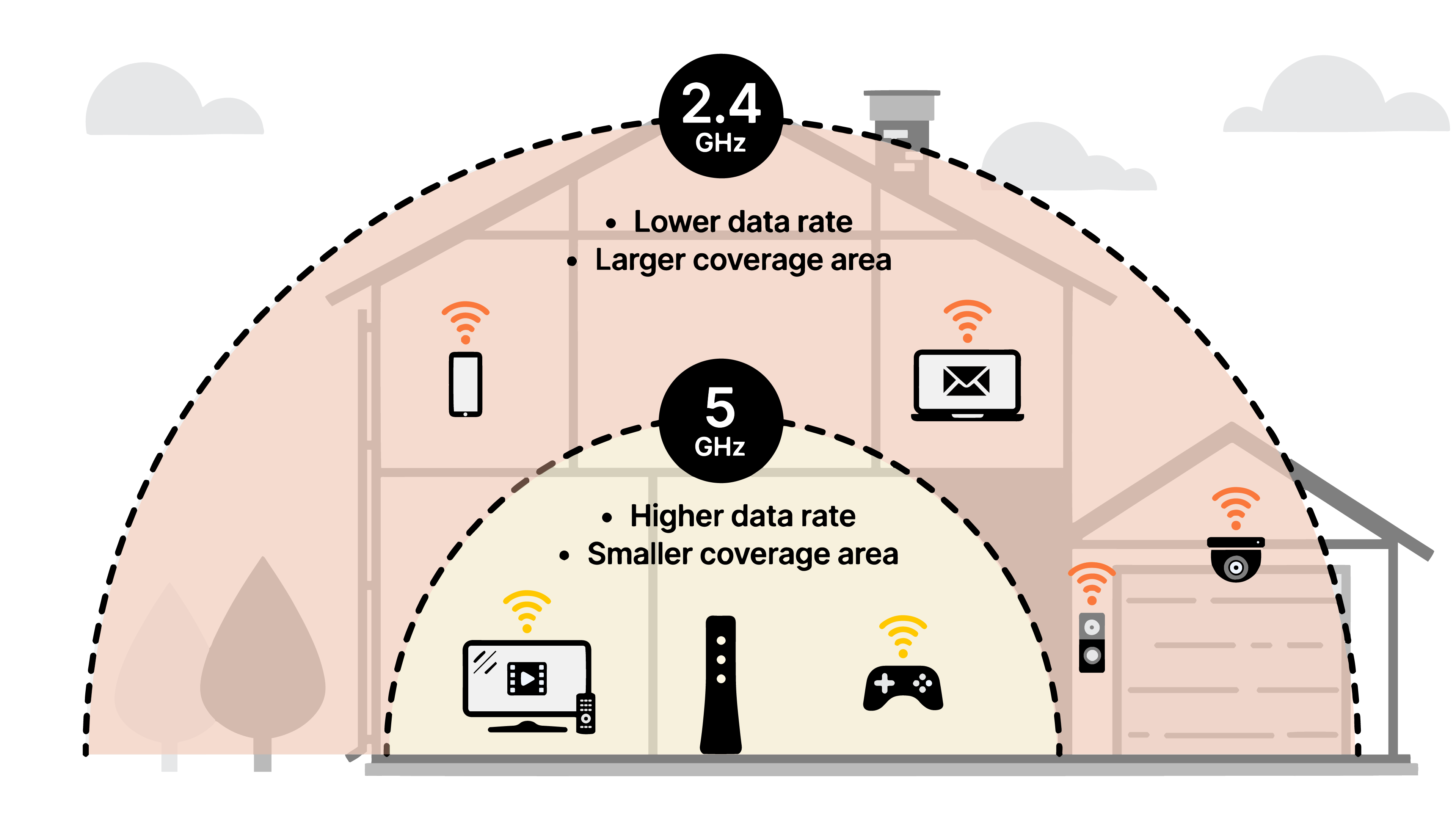
To fully utilize your upgraded network, enable key features like OFDMA and MU-MIMO in your router settings to handle multiple connections smoothly. Use the right frequency bands—2.4 GHz for long-range, 5 GHz for high-speed tasks, and 6 GHz (available with Wi-Fi 6E and Wi-Fi 7) for ultra-fast, low-latency performance. If you have a large home, consider a mesh Wi-Fi system for seamless coverage. Lastly, keep your router firmware updated to maintain top-notch security and performance.
Ready to Upgrade?
Wi-Fi 6 is already a solid investment, and Wi-Fi 7 will push boundaries even further. If you’re looking for faster speeds, better stability, and future-proofing your home network, upgrading makes sense. Need help choosing the right setup? Contact IVC Telecom to find the best Wi-Fi solution for your needs!