
Blog
eSIM or Physical SIM: Which One Works Best for You in 2025?
In today’s world, a strong and reliable Wi-Fi connection is as essential as running water and electricity. Whether you’re working from home, streaming your favorite shows, or gaming online, slow or spotty Wi-Fi can be incredibly frustrating. Fortunately, there are simple steps you can take to improve your home network’s performance. Let’s dive into some practical tips to help you get the most out of your Wi-Fi.
1. Perfect Your Router Placement
Think of your Wi-Fi router like a radio station broadcasting a signal throughout your home. Where you place it can make a huge difference in performance.
- Place it in a central location – Your router’s signal spreads out in all directions, so keeping it near the middle of your home ensures a more even distribution.
- Avoid obstructions – Thick walls, large furniture, and even mirrors can weaken Wi-Fi signals. Keep your router in an open space, away from obstacles.
- Elevate the router – Positioning your router on a shelf or mounted on a wall can help the signal travel further, compared to placing it on the floor.
2. Choose the Right Wi-Fi Channel
Routers transmit on different channels, and if your neighbors are using the same one, it can cause interference and slow down your speed.
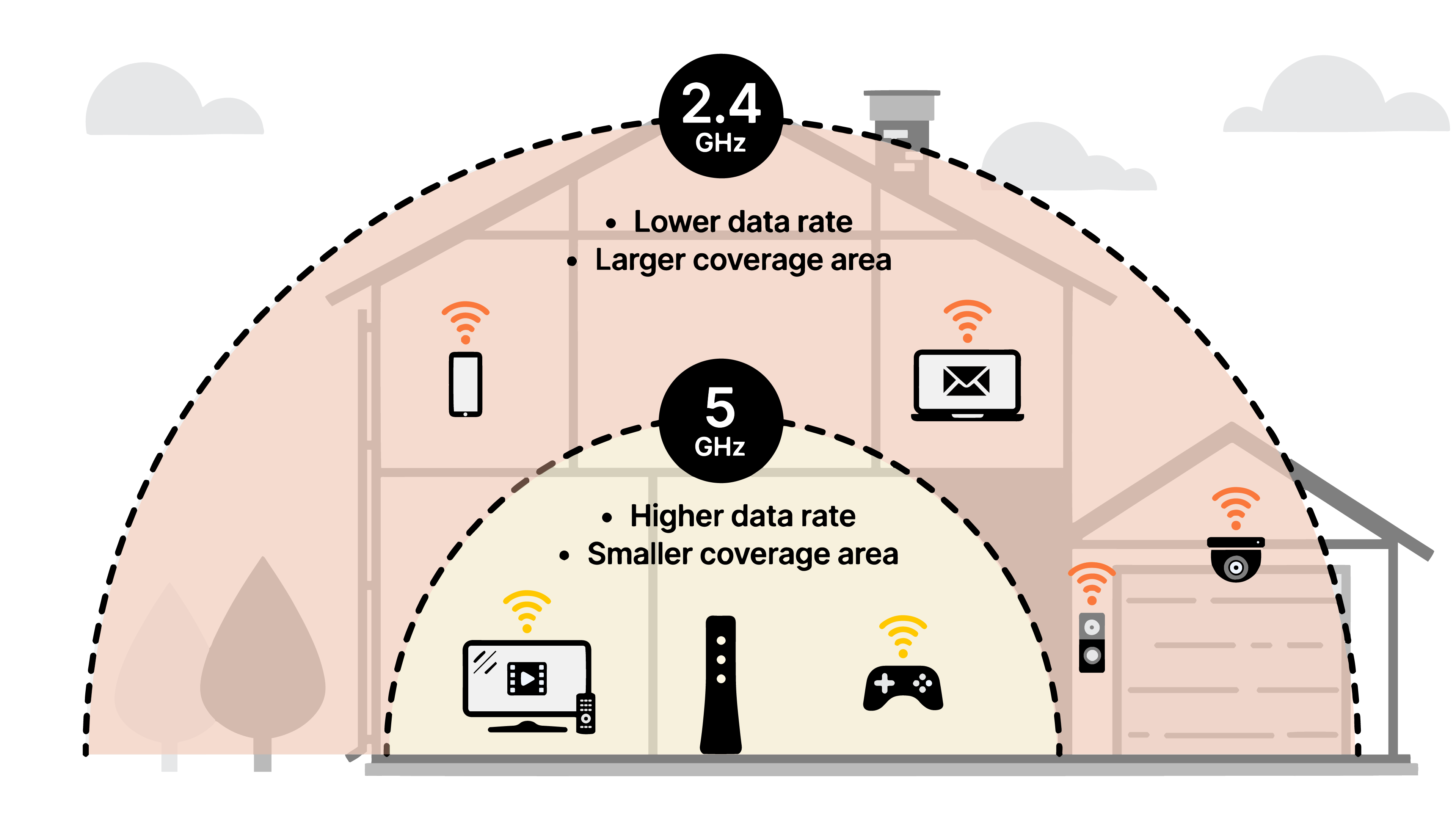
- Use 5GHz when possible – Most modern routers support 2.4GHz and 5GHz bands. The 5GHz band offers faster speeds and less interference but has a shorter range. Use it for devices that need high-speed internet, like gaming consoles and smart TVs.
- Switch to a less crowded channel – You can use apps like Wi-Fi Analyzer (for Android) or built-in tools on some routers to check which channels are least congested and switch accordingly.
3. Update Your Router’s Firmware
Router manufacturers regularly release firmware updates to improve performance and security.
- Check for updates – Log into your router’s settings (usually by typing 192.168.1.1 into your web browser) and look for a firmware update option.
- Set automatic updates – Some newer routers allow automatic updates, so you don’t have to worry about manually checking.
4. Secure Your Network
A weak Wi-Fi password can let unwanted users slow down your network (or worse, access your personal data).
- Use WPA3 or WPA2 encryption – These are the best security options available for home networks. Avoid using outdated WEP security, which is easily hackable.
- Create a strong password – Use a mix of uppercase, lowercase, numbers, and symbols. A good example: H0m3W!f1Rul3s!
- Set up a guest network – If you have visitors who need Wi-Fi, a guest network keeps them from accessing your main devices while still allowing them to connect to the internet.
5. Reduce Interference from Other
Devices
Did you know that household devices like microwaves, cordless phones, and baby monitors can interfere with your Wi-Fi signal?
- Keep your router away from these devices – If your Wi-Fi slows down when using a microwave, try repositioning your router.
- Switch to wired connections where possible – For devices that don’t need to move around (like gaming consoles or desktop computers), using an Ethernet cable instead of Wi-Fi can free up bandwidth for wireless devices.
6. Consider Upgrading Your Router
If you’ve tried all the above and still experience slow Wi-Fi, your router might be outdated.
- Upgrade to a Wi-Fi 6 router – Wi-Fi 6 offers better speeds, more capacity, and improved efficiency for multiple devices.
- Use mesh Wi-Fi for large homes – If you live in a bigger space or have dead zones, a mesh Wi-Fi system can extend coverage throughout your home.
Final Thoughts
Improving your home Wi-Fi doesn’t have to be complicated. A few small adjustments—like moving your router, choosing the right channel, and securing your network—can make a big difference. Try these tips, and you’ll be enjoying a faster, more reliable internet connection in no time!
Have any questions about your home Wi-Fi? Reach out to IVC Telecom Support, and we’ll be happy to help!