Blog
eSIM or Physical SIM: Which One Works Best for You in 2025?
Understanding the Basics
Most
modern routers support both 2.4GHz and 5GHz frequency bands, commonly known as
“dual-band” routers. While both serve the same purpose, providing wireless
internet access, their behaviour and strengths vary:
•
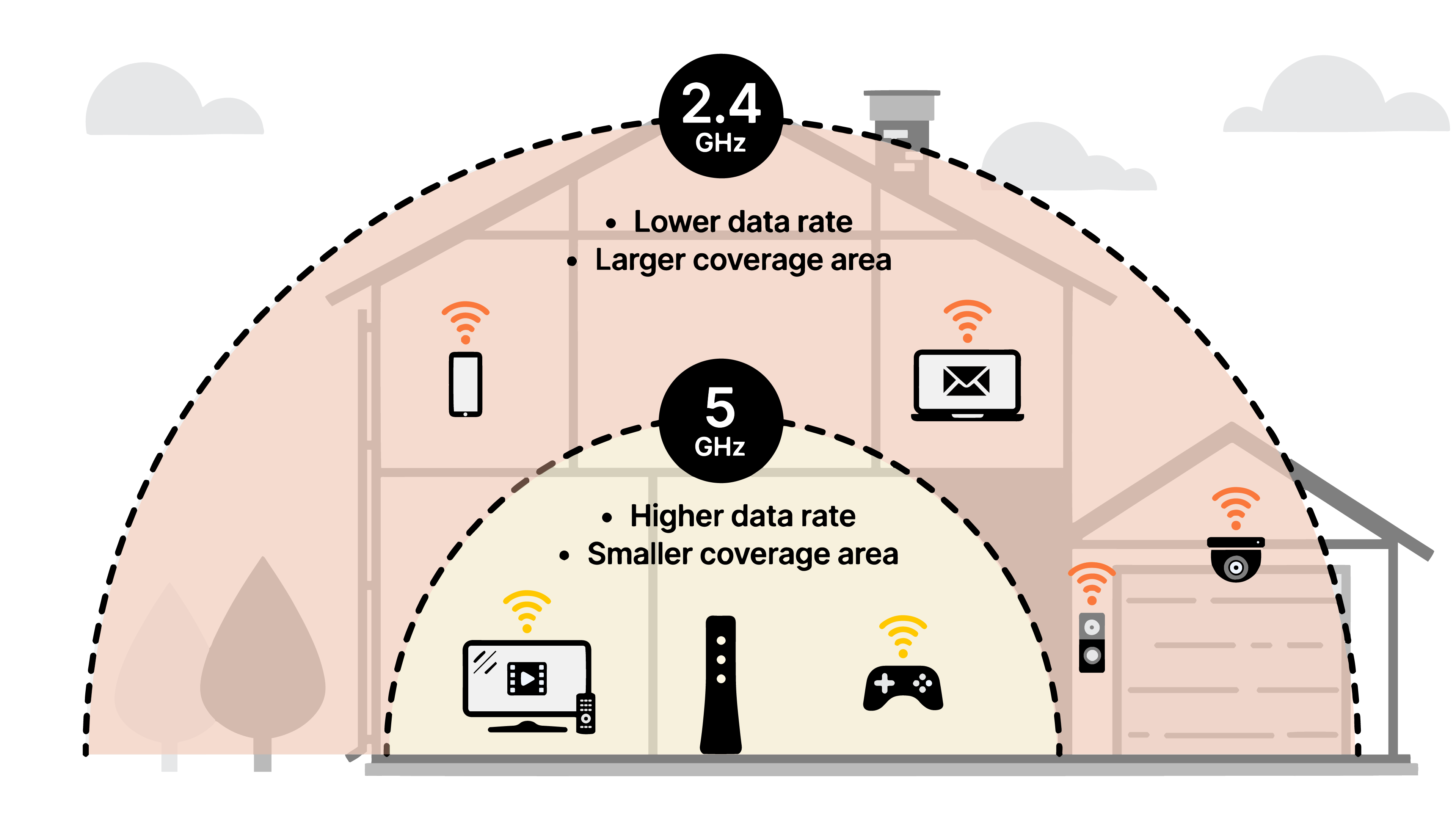
2.4GHz operates over a longer range and penetrates walls more effectively.
•
5GHz delivers faster speeds but covers a shorter distance.
Understanding
how each works can help you place your devices on the right band for better
performance.
2.4GHz: Wider Range, More Compatibility
The
2.4GHz band is the more established of the two and is supported by nearly every
Wi-Fi-enabled device on the market.
Advantages:
•
Better coverage, signals travel farther and through walls more effectively.
•
Compatible with older devices such as smart plugs, sensors, and older phones
often only support 2.4GHz.
•
Ideal for IoT devices, most smart home gadgets rely on this band.
Considerations:
•
Slower speeds: Generally maxes out at lower data rates compared to 5GHz.
•
More congestion: Many common household items (microwaves, baby monitors)
operate on 2.4GHz, increasing interference.
5GHz: Faster Speeds for Modern Needs
The
5GHz band is newer and optimized for speed, making it ideal for today’s
high-demand applications.
Advantages:
•
Higher speeds: Perfect for 4K streaming, video conferencing, and online gaming.
•
Less interference: Fewer devices use this frequency, providing a cleaner
signal.
•
More bandwidth: Supports higher throughput for multiple users.
Considerations:
•
Shorter range: The signal is more easily blocked by walls and obstacles.
•
Limited compatibility: Some older devices may not detect or connect to 5GHz.
When to Use Each Band
Many
newer routers include band steering, which automatically connects your device
to the optimal band. However, manual selection still allows for better
performance in some cases.
Use
2.4GHz if:
•
Your device is far from the router or on another floor.
•
You're connecting smart home devices.
•
You prioritize connection stability over speed.
Use
5GHz if:
•
Your device is in the same room or within close proximity to the router.
•
You need fast, uninterrupted internet for video calls or streaming.
•
You want low latency for gaming or large file downloads.
Tips for Better Performance
•
Label your networks. Name each band separately so you can choose which to
connect to.
•
Place your router wisely. A central, elevated location helps both bands perform
better.
•
Avoid overcrowding. Spread out your devices across both bands based on usage
needs.
•
Upgrade when needed. Older routers may limit the benefits of either band.
Consider switching to a Wi-Fi 6 router for improved efficiency.
Final Thoughts: It’s Not About Choosing One Over the Other
The
truth is, you don’t need to choose between 2.4GHz and 5GHz. You can (and
should) use both. Think of them as complementary tools: one built for range and
compatibility, the other for speed and performance.
At
IVC Telecom, we provide our customers with dual-band and Wi-Fi 6 enabled
routers that are optimized for modern Canadian households. Whether you live in
a condo, townhouse, or multi-level home, our team can help configure your Wi-Fi
setup for maximum efficiency and coverage.
Need
help optimizing your home network?
Contact
IVC Telecom today, we’ll help you get the most out of every megabit or check
out our plans at: https://www.ivctel.com/Internet